WORK ORDER SYSTEMFOR FIELD SERVICE

Schedule the job.
Invoice the job.
Get paid.

Dispatch is a scheduling, invoicing, and payments system built for repair and service businesses — see where every tech is, send a professional invoice with a signature and a card-payment link, and know exactly what's outstanding. One board, not four tools.
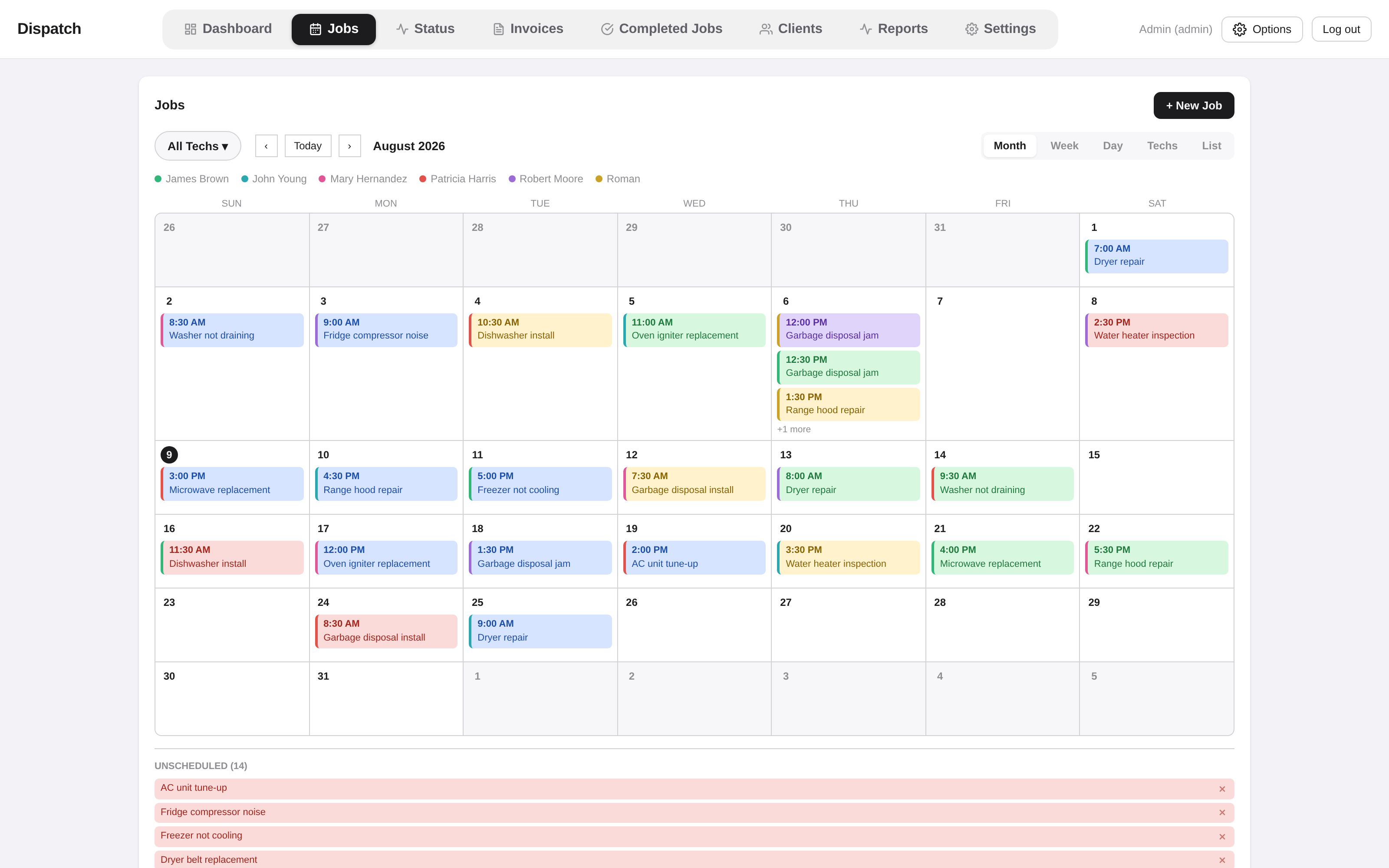
Dispatch job board showing a month of scheduled repair jobs, color-coded by technician, with an unscheduled job queue below.
WO-1001Scheduling & Dispatch
Month view of the Jobs board with color-coded techs and an unscheduled job queue

See the whole week without flipping tabs

Drag a job to a new day or a different tech and it's rescheduled — no confirmation dialogs, no page reload. Switch between Month, Week, Day, Techs, and List views depending on how much detail you need, and anything that hasn't been scheduled yet sits in its own queue so it never gets lost.

  • Month / Week / Day / Techs / List views
  • Drag-and-drop reschedule and reassign
  • Color-coded by technician
  • Unscheduled queue that never disappears
WO-1002Invoicing
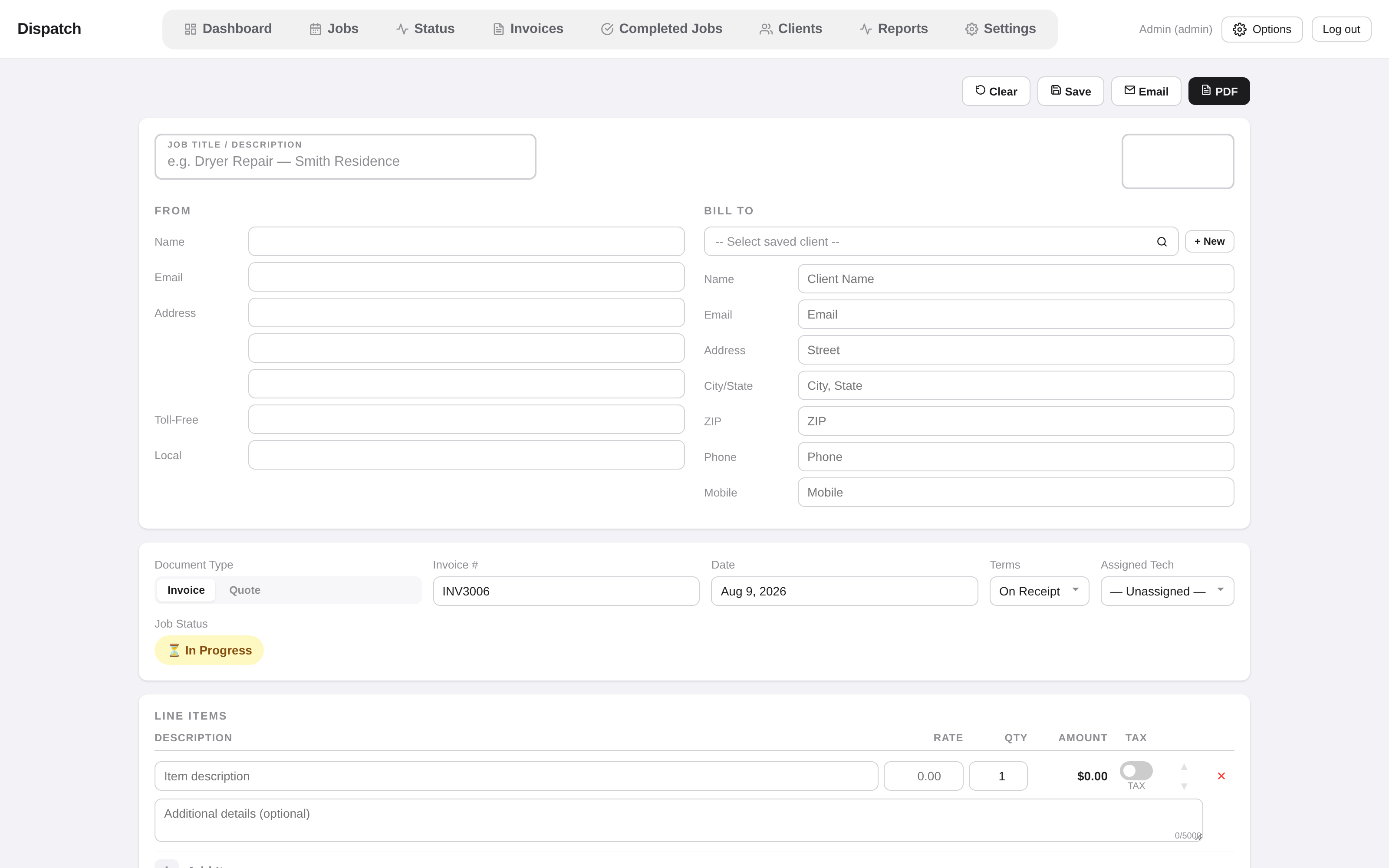
New invoice form with line items, tax, client details, and signature capture

An invoice that looks like it came from a real business

Build line items with tax and discounts, capture a signature on the spot, and generate a clean PDF — no third-party invoicing tool required. Every invoice is tied back to the job it came from, so nothing has to be re-typed.

  • Line items with tax & flat-$ or % discounts
  • Digital signature capture
  • Instant PDF generation
  • Parts, equipment & job-photo tracking
WO-1003Payments & Reporting
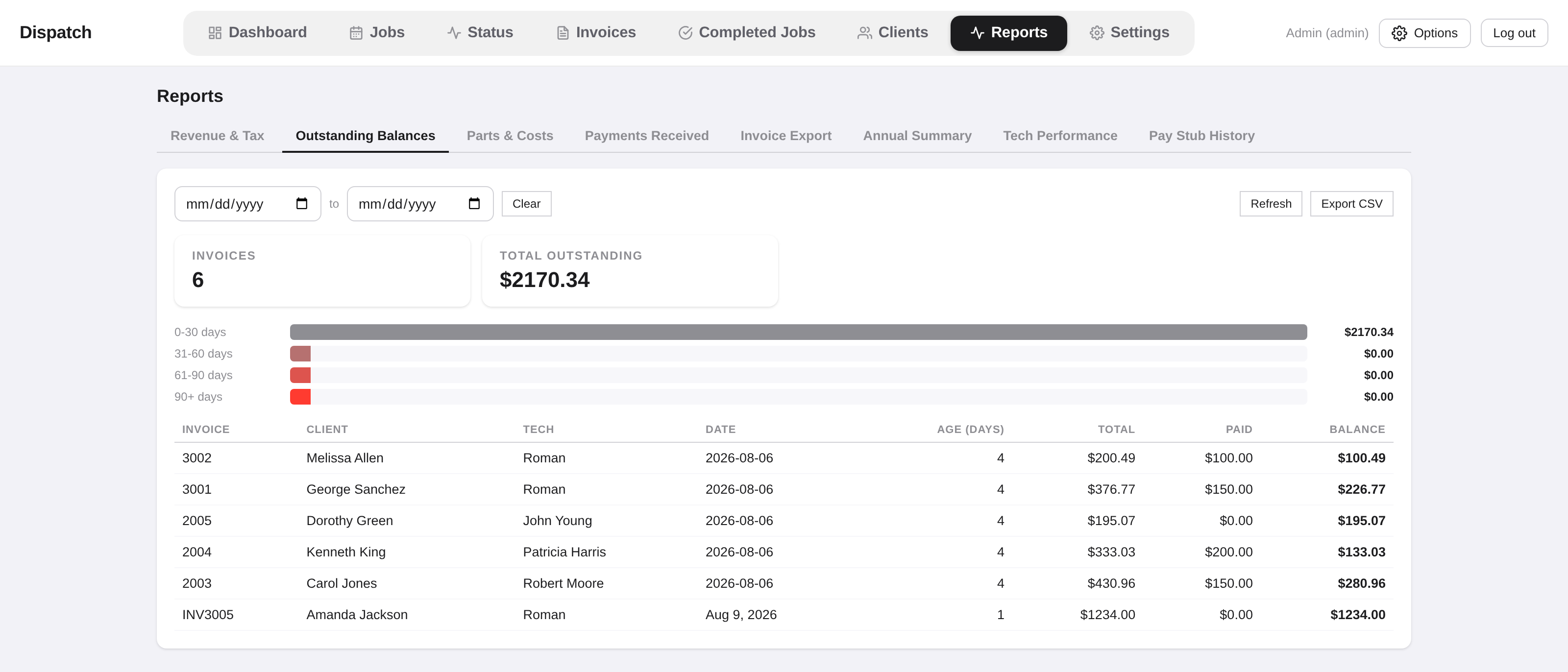
Outstanding Balances report with an aging chart broken into 0-30, 31-60, 61-90, and 90+ day buckets

Chase balances, not paperwork

Every invoice shows exactly what's paid, what's partial, and what's unpaid at a glance, and clients can pay by card without a phone call. When something's overdue, the aging report tells you by how long, not just by how much.

  • Card payments, built in (Stripe)
  • Paid / Partial / Unpaid at a glance
  • Aging report — 0–30 / 31–60 / 61–90 / 90+ days
  • CSV export for your books
WO-1004The Tech's Side
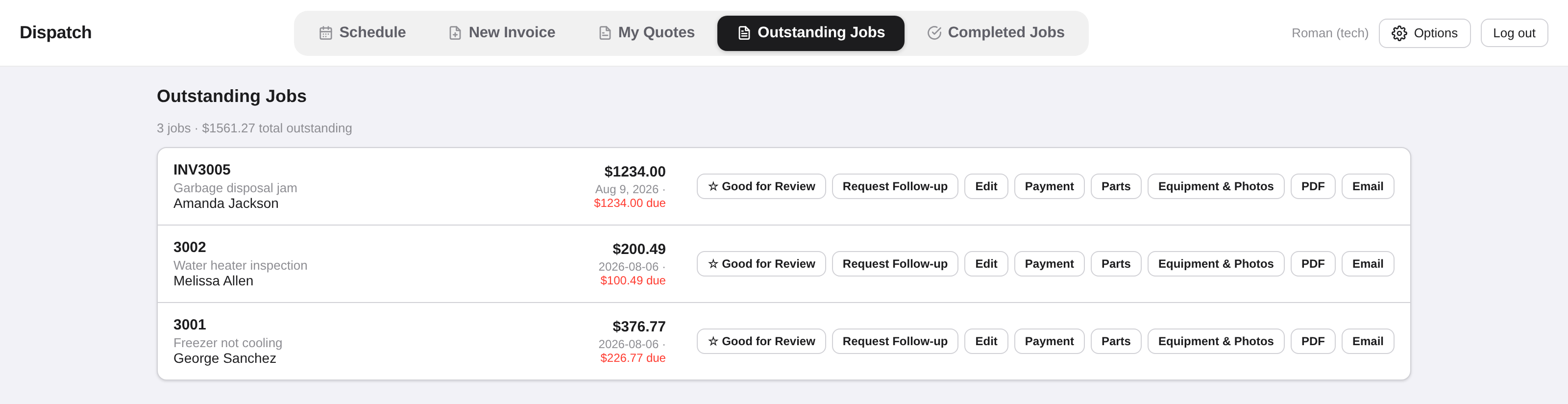
A tech's Outstanding Jobs view with buttons to flag a job Good for Review, request a follow-up, record payment, and more

Techs don't need to call the office

From a job in the field, a tech can request a follow-up visit, flag a completed job as good for a review, and see exactly what's still owed on it — no separate spreadsheet, no group text.

  • Tech-facing Outstanding & Completed Jobs views
  • Request a follow-up straight from an invoice
  • Flag jobs "Good for Review"
  • Role-based access — admin, dispatcher, tech, bookkeeper
WO-1005Clients
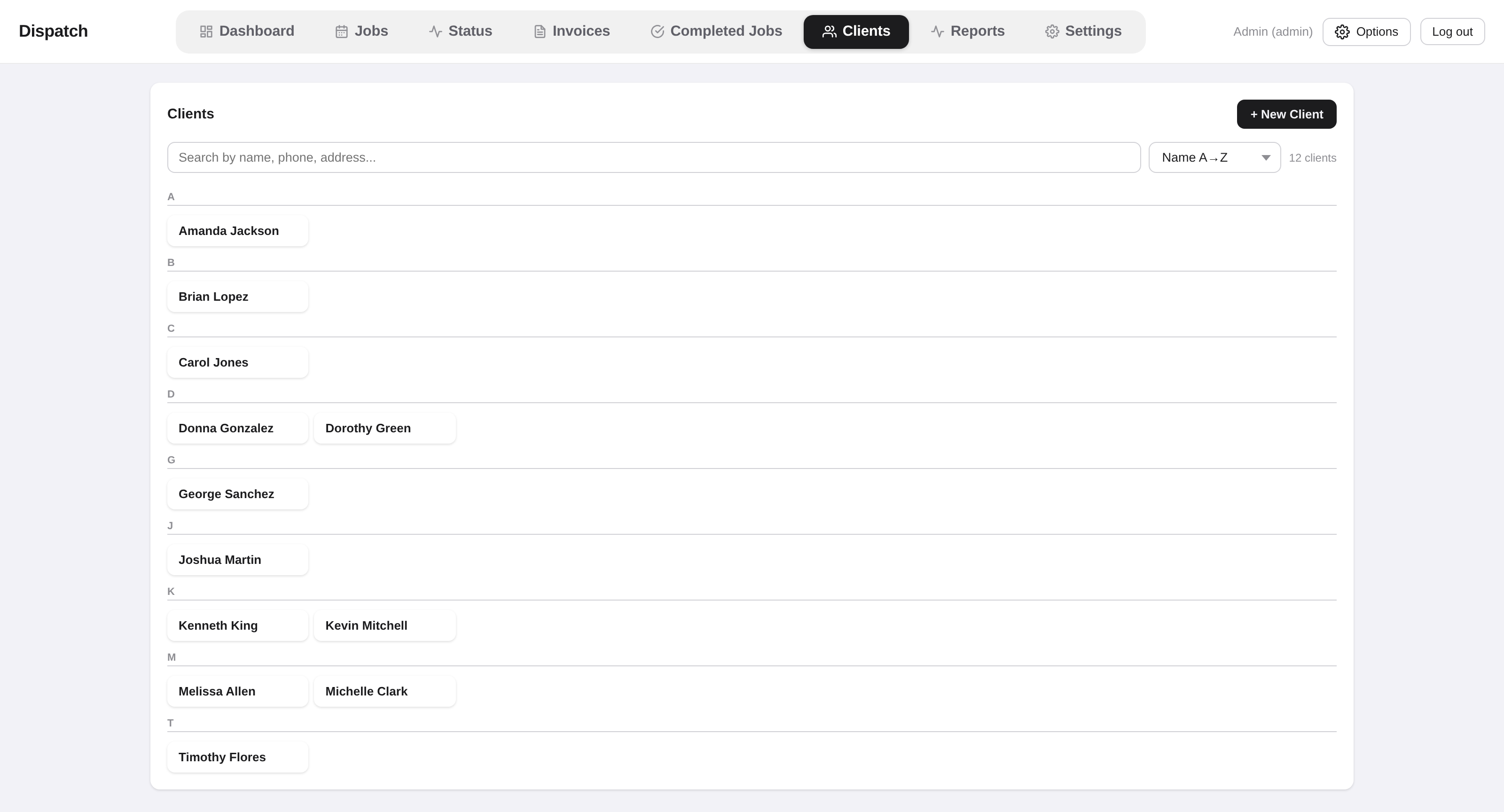
Searchable client directory grouped alphabetically

Client history that's actually there when you need it

Search by name, phone, or address and pull up everything — past jobs, invoices, notes — instead of digging through old texts and paper folders.

  • Searchable client directory
  • Full job & invoice history per client
  • Booking request intake
  • Automatic SMS & email on status changes
MANIFESTEverything, in full

The complete feature list

Everything above, plus what didn't get its own screenshot.

Scheduling & Dispatch

  • Month / Week / Day / Techs / List views
  • Drag-to-reschedule & reassign
  • Unscheduled job queue
  • Job lifecycle tracking (unscheduled → scheduled → on my way → in progress → completed → invoiced)
  • No-show tracking
  • Follow-up & recall visit types

Invoicing

  • Line items with tax
  • Flat-$ or % discounts
  • Digital signature capture
  • Instant PDF generation
  • Quotes
  • Parts, equipment & photo tracking
  • Invoice CSV export

Payments

  • Card payments via Stripe
  • Pay-by-link over email or text
  • Partial payments & deposits
  • Payment-method breakdown reporting

Communication

  • Automatic SMS & email on status changes
  • Email or text an invoice
  • Booking request intake
  • Client review requests

Reporting

  • Dashboard — today's jobs, revenue, outstanding, no-shows
  • Revenue & Tax
  • Outstanding Balances aging
  • Parts & Costs
  • Payments Received
  • Tech Performance & Annual Summary

Team & Access

  • Role-based access — admin, dispatcher, tech, bookkeeper
  • Tech self-serve schedule & invoices
  • Pay stub generation & history
  • Client management with search & history
  • Light/dark mode plus a choice of color themes (Dispatch, Slate, Classic)
NO. 000000OPEN TICKET

Want to run your own jobs through it?

It's still actively being built, but it's been solid for day-to-day use. Message me and I'll set you up with a demo account on your own data.